Google + Linux + MySpace = gOS Space

Posted by MH | 10:21 PM
Tuesday, August 12, 2008

A few months ago I posted about a Linux distro called gOS, the Google-Linux distro. To refresh things, gOS is based on the most widely acclaimed Ubuntu Linux and integrates all Google services like GMail, Google News, Google Docs, Google Calendar, Google Maps, YouTube and Blogger into the distro for one-click access. Back then, gOS was based on the Enlightenment E17 window manager, with no support for KDE or Gnome. Now gOS is available in three different versions - gOS Rocket E, which is the Enlightenment based version, gOS Rocket G which is based on Gnome and another fresh one called gOS Space which includes MySpace applications for photos, music, movies, TV etc.

Jack Wallen on TechRepublic writes:

gOS Space uses a combination of GNOME, Compiz Fusion, the Avant Window Navigator, and a bit of Enlightenment E17 code. This combination makes for a very interesting user experience that, as far as I know, is unique only to Space. Unfortunately this combination causes the minimum requirements to mimic that of the latest Ubuntu.
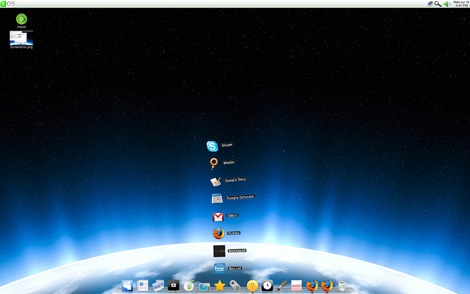
gOS-Space

The most exiting feature in Space is the Stack, which is something like a collapsible folder that sits on the Dock. When you click on the folder in the dock, the Stack extends vertically. Everything except the expanded folders is transparent so you do not see the expandable menu popping up.

A more detailed review can be read at TechRepublic

After you download any Linux distro from the internet, you have to burn it to a DVD, CD or a number of CDs to install it. That CD or DVD is generally used only once after which it lies unused , and worse, almost every Linux distro comes up with a new release every 6 months. So if you are in the habit of upgrading to every new version, you must have dozens of CDs lying at the bottom of your drawer. What a wastage of CDs! But with a little trick you can install any Linux directly from the hard disk without burning a single CD or DVD. The prerequisite of this trick is to have an operating system already installed on your computer. This is obvious because unless you are able to boot into your machine, you can't install anything; and we are not going to boot from the Linux disk because we aren't burning any. Here I'm going to focus on Microsoft Windows as the pre installed operating system.

Almost all Linux installers uses two files to boot the computer: a Linux kernel, and an initial root file system containing a minimal set of directories that is mounted prior to when the real root file system is available. This initial root file system is also called Ram disk (initrd). We will use these two files to boot our PC. Now lets get to the actual procedure.

1. The first thing you will have to do is copy the ISO file(s) of the Linux to your hard disk (ofcourse, you already have it). Make sure that the partition is FAT32 unless the distro you are installing has native NTFS read/write support. Some distros require you to copy the ISO file(s) to the root of the partition. If you keep it inside a folder, the setup might not be able to detect it.

2. Use Winrar to open the ISO file (you need not need to extract it). Now you will have to extract the two files I talked about earlier. The files are usually found inside a directory called isolinux. Different distros might place the files in different location; you just have to search for it, but it isn't hard to locate. These two files are also named differently in different distros. The files that you will need to search and extract are: (the kernel file is shown in green and the Ram disk is shown in red)

Fedora: vmlinuz and initrd.img

Suse: linux and initrd

Mandriva: vmlinuz and all.rdz

Ubuntu: vmlinuz and initrd.gz

Gentoo: gentoo and gentoo.igz

Knoppix: vmlinuz and initrd.img

Slackware: bzImage and initrd.img

Debian: vmlinuz and initrd.gz

3. After you have extracted the two files, copy them to c:\boot (you will need to create the folder "boot")

4. Now download the file called grub4dos from here. (Note: the new versions of grub4dos i.e. 0.4.2 and 0.4.3 does not work. So download the earlier version 0.4.1. Direct download link) Extract the folder "boot" and the file "grldr" from the downloaded zip file. Inside the folder "boot" is another folder called "grub"; copy the folder "grub" to c:\boot. Copy the file "grldr" to c:\

5. Open c:\boot\grub\menu.lst and add these following lines. (Notice that hd0 refers to the first hard drive. If you have more than one hard drive, they will be named hd1, hd2 etc. Replace hd0 with the proper hard drive number incase you have windows installed on another drive.) Replace Linux_kernel and Ram_disk

with the appropriate file names below. (the ones you copied to c:\boot)


title Install Linux
kernel (hd0,0)/boot/Linux_kernel
initrd (hd0,0)/boot/Ram_disk


6. Now you have to add grub to your c:\boot.ini file. You can open boot.ini by clicking on Start>Run and typing c:\boot.ini. If Windows does not allow the file to be modified, then go to Control Panel>System and click on the Advanced tab. Now under Startup and Recovery click Settings and then under System Startup click Edit. Open boot.ini and add this line in the end.

C:\grldr=”Start GRUB”

7. You are now ready to install Linux. Restart your PC and from the boot screen select "Start GRUB". This will load GRUB. From the grub screen select "Install Linux". During the setup you will be asked the source of installation. Choose hard disk and then select the hard drive partition where you copied the ISO files. Sometimes you might have to type the whole path of the partition and the exact name of the ISO. So write it down before you begin.

I have personally tested this with Fedora, Suse and Mandriva and it works without problem. I have no doubt it will work for others too.

Update: dougfractal adds that this is possible from Linux too. The method as he describes is:

From the terminal enter these commands

sudo mkdir /distro
sudo chmod `whoami`:`whoami`
cp MYLINUX.iso /distro/distro.iso

Now extract Linux_kernel & Ram_disk to /distro#

Open /boot/grub/menu.lst

#ADD NEW ENTRY#
title Install Linux
root (hdX,X)
kernel /distro/Linux_kernel
initrd /distro/Ram_disk

Reboot and select "Install Linux" from grub.

This is a theme for migrating Linux users who feel they are more comfortable with the Windows interface. LXP is a project that provides Linux/Unix users with a desktop that has a Microsoft Windows XP "look & feel" that is nearly identical to the real thing.

The LXP project has achieved this by collecting and modifying different pieces of the Open Source GNU software such as icewm, idesk, xfe, and others.

The LXP theme has been tested on the following distributions:
Fedora Core 3, 4, 5 and 6
Open Suse 10.1
SUSE Linux Enterprise Desktop 10
Ubuntu 6.06, 6.10
Xubuntu 6.06, 6.10
Kubuntu 6.06, 6.10
Debian Testing (Etch)


lxp screenshot

lxp screenshot


Download and installation instructions

WALTHAM, Mass., Aug. 5 /PRNewswire-FirstCall/ -- Enabling customers to run their time-critical business applications faster, and with more reliability and predictability, Novell today announced SUSE(R) Linux Enterprise Real Time 10 is now certified on select IBM BladeCenter hardware and supported by IBM WebSphere Real Time middleware. Utilizing best-of-breed products, Novell's
real-time operating system and IBM's real-time Java hardware together ensure enterprises running latency-sensitive applications have the highest possible performance and availability across their entire solution stack.


"IBM and Novell are leveraging their strengths to deliver complete Linux-based solutions for customers looking for ways to reduce latency and increase the availability of their time-sensitive applications by running them on a certified and supported open source-based solution stack," said Inna
Kuznetsova, director of Linux at IBM. "Real-time Linux enables customers to prioritize processes and allows for a predictable period of completion on many time-sensitive projects, including critical tasks such as derivatives trading."


Companies are increasingly standardizing on Java for its portability and time to market advantages. Until recently, however, enterprises running time-critical Java applications could not guarantee they would meet necessary time constraints and quality of service metrics. Combining IBM BladeCenter
hardware and IBM WebSphere Real Time with SUSE Linux Enterprise Real Time 10 from Novell(R) ensures time-sensitive Java workloads will deliver predictable performance, each and every time. This means mission critical enterprises, such as financial services organizations, are able to meet their external and internal customer commitments.


"SUSE Linux Enterprise Real Time from Novell is fully supported with WebSphere Real Time and certified on select IBM BladeCenter hardware," said Roger Levy, senior vice president and general manager of Open Platform Solutions at Novell. "Enterprises that require their Java applications to meet strict deadlines now have access to an integrated, tested and optimized development and run-time environment for time-critical Java workloads."


Pricing and Availability


SUSE Linux Enterprise Real Time 10 is available for a suggested $2,500 annual subscription. More information on pricing and availability can be found at http://www.novell.com/realtime.


SUSE Linux Enterprise Real Time 10 inherits the strengths of the SUSE Linux Enterprise platform. The next-generation platform for the open enterprise, SUSE Linux Enterprise is the best-engineered and most interoperable platform for mission-critical computing, from the desktop to the data center. SUSE Linux Enterprise Real Time is fully integrated with ZENworks(R) Orchestrator, Novell's solution for scalable management of heterogeneous resources. Together, the two products extend low-latency
benefits beyond applications and into the data center. For more information on SUSE Linux Enterprise offerings from Novell, visit
http://www.novell.com/linux.


About Novell


Novell, Inc. (Nasdaq: NOVL) delivers the best engineered, most interoperable Linux* platform and a portfolio of integrated IT management software that helps customers around the world reduce cost, complexity and risk. With our infrastructure software and ecosystem of partnerships, Novell harmoniously integrates mixed IT environments, allowing people and technology to work as one. For more information, visit http://www.novell.com.


Novell, SUSE and ZENworks are registered trademarks of Novell, Inc. in the United States and other countries. *Linux is a registered trademark of Linus Torvalds. All other third-party trademarks are the property of their
respective owners.


SOURCE Novell, Inc.

IBM Tuesday marked its 10 years of participation in Linux and open source by introducing new software, upgrades to existing platforms and an open source code contribution focused on supercomputing.

The announcements were made at the LinuxWorld/Next Generation Data Center conference that opened Monday. (Disclosure: The conference is run by Network World’s parent company IDG.)

The company also introduced a software appliance toolkit and announced it would pre-load Novell SuSE Linux Enterprise Server 10 in Lotus Foundations to battle Microsoft Small Business Server.

IBM also said it would expand its real-time Linux initiative and it introduced version 5.4 of z/VM, its virtualization platform.

IBM plans to marry its Lotus Foundations, hardware and software pre-configured into a bundle, with Novell’s Linux operating system. IBM already has users testing an appliance made up of Domino mail/collaboration, file management, directory services, firewall, back-up, recovery and the Lotus Symphony productivity applications.

The company hopes to challenge Microsoft’s Small Business Server, a bundle of infrastructure software designed for small and midsized businesses. IBM also unveiled an ISV Software Appliance Initiative to help ISVs deliver their applications on an appliance.

“We will push Foundations as a head-to-head competitor with Small Business Server,” said Jeff Smith, vice president of open source and Linux middleware. “We think it is a very compelling alternative and brings openness to the world of small businesses.”

IBM also said it would work with Canonical/Ubuntu, Novell and Red Hat and a number of hardware partners it did not name to deliver in 2009 “Microsoft-free” PCs with Lotus Notes and Symphony.

The company said integration between Linux and Microsoft desktops and the proliferation of client computing devices such as the Smartphone would provide the opportunity to finally make a noticeable dent in Microsoft’s stranglehold on the desktop.

IBM said its supercomputing code donation would be housed at the University of Illinois, and announced it is adding support for Novell’s SuSE Linux Enterprise Real Time on some of its BladeCenter servers and with WebSphere Real Time.